
If you've scrolled through TikTok or Instagram lately, you've almost certainly spotted them: portraits transformed into chunky, warm, impossibly tactile clay figures that look straight out of a stop-motion film. The AI claymation filter has become the breakout visual trend of early 2026, turning ordinary selfies into handcrafted masterpieces that radiate warmth, nostalgia, and undeniable charm.
This guide covers everything you need to know — from the best tools and prompts to pro tips for getting the perfect clay portrait every time.
What Is the AI Claymation Style?
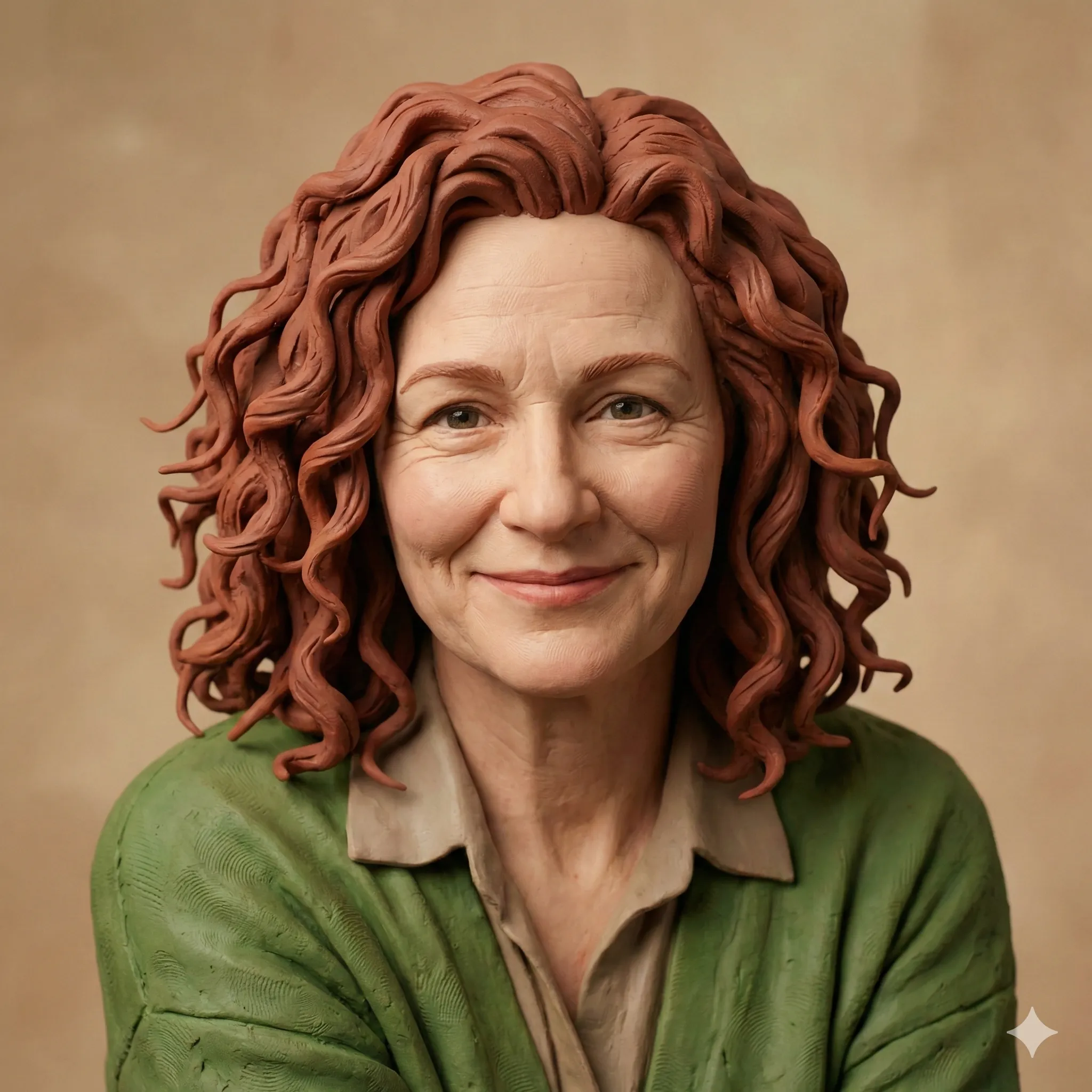
The AI claymation style transforms photos into images that mimic the aesthetic of stop-motion clay animation — think Wallace & Gromit, Shaun the Sheep, or Pingu. The hallmark qualities of a great claymation portrait include:
Tactile Clay Texture
Realistic matte surface that looks like you could reach in and touch it
Fingerprint Marks and Imperfections
Subtle details that give the appearance of handcrafted work
Chunky, Rounded Forms
Simplified facial features with soft, sculptural edges
Warm, Earthy Color Palettes
Rich tones similar to real clay and plasticine
Expressive, Exaggerated Features
Large eyes and playful proportions that amplify personality
Unlike flat digital cartoons or anime-style conversions, the claymation look taps into something deeply nostalgic — the memory of actual physical media made by human hands, recreated by AI at stunning quality.

Why Has the Claymation Trend Gone Viral in 2026?
The timing makes perfect sense. After years of hyper-realistic filters and uncanny valley AI portraits, audiences are craving something warmer, more imperfect, and more human.
Why Claymation Went Viral
| Trend Driver | Why It Works |
|---|---|
| Nostalgia Factor | References beloved childhood films like Wallace & Gromit |
| Tactile Appeal | Stands out from flat digital styles |
| Works on Everyone | Flattering for all ages, great for pets and babies too |
| High Shareability | Instantly recognizable and eye-catching in feeds |
| Emotional Warmth | Clay aesthetic reads as friendly and approachable |
| Easy to Create | Multiple free tools make it accessible |
Canva launched a dedicated claymation app ("Claymify") that went viral within its first week. Tools like Reface.ai, LightX, and Fotor all added dedicated clay filter modes. TikTok's algorithm heavily favored claymation content throughout January and February 2026, leading to hundreds of millions of views under the #ClayFilter hashtag.
Industry Perspective
Digital marketing analyst Sarah Chen noted in a February 2026 report: "The claymation aesthetic represents a counterreaction to AI perfection. It's the visual equivalent of sourdough bread — handcrafted imperfection as a luxury signal."
Best AI Tools for Claymation Style
Canva Claymify App
Best for BeginnersCanva's purpose-built Claymify app is the easiest entry point. No prompts needed, consistent results, and a free tier available. The trade-off is limited customization and a watermark on the free plan.
Best for: First-timers who want instant results without any technical setup.
ChatGPT with GPT-4o
Best for CustomizationFor maximum control over your claymation portrait, ChatGPT remains the gold standard. Upload a clear photo, craft a detailed prompt, and GPT-4o renders a faithful clay portrait — with full control over texture, lighting, and mood.
Best for: Users who want precise results and enjoy refining through conversation.
Reface.ai Clay Filter
Best Mobile AppReface.ai's dedicated clay photo filter offers one-tap transformation with impressive quality. Processes images locally on device — a meaningful privacy advantage over cloud-based tools. Exports up to 4K resolution.
Best for: Mobile-first users who want high quality without cloud uploads.
LightX AI Clay Effect
Best for Batch ProcessingLightX offers a web-based clay effect generator that handles up to 10 photos simultaneously — ideal for family portraits or pet photos. Includes adjustable clay density and background replacement options.
Best for: Anyone processing multiple photos at once.
Fotor Clay Effect
Best Free OptionFotor's clay effect is robust, completely free, and requires no account creation. Visit Fotor.com, select "AI Effects" → "Clay", upload your photo, and download without a watermark.
Best for: Anyone wanting a zero-cost, no-signup clay transformation.

Step-by-Step: Create Your Clay Portrait with ChatGPT
Open ChatGPT Plus or Pro
Image generation requires a ChatGPT Plus or Pro account. The free tier has limited daily generations.
Upload a Clear Photo
Choose a well-lit, front-facing or three-quarter angle photo with a simple background. Minimum 1080px resolution.
Enter Your Claymation Prompt
Use this proven prompt:
"Transform this photo into a 3D claymation-style portrait. Make it look like a handcrafted clay figure from a stop-motion animated film. Include visible clay texture, subtle fingerprint marks, rounded soft edges, and a matte finish. The color palette should be warm and earthy. Style similar to Wallace & Gromit or Shaun the Sheep. Maintain the likeness and expression from the original photo."
Refine With Follow-Up Prompts
Adjust until the result matches your vision. Try: "Add more visible clay texture to the skin," "Make the figure more rounded and sculptural," or "Add a simple clay background environment."
Download and Share
Right-click the generated image and save at full resolution. Use directly or bring into Canva for further compositing.
Best Claymation Prompts for Different Subjects
Portrait / Selfie
"Convert this portrait into a studio-quality 3D clay animation character. Warm studio lighting, visible clay texture on skin, slightly exaggerated features, Aardman Animations aesthetic, matte clay surface, charming and friendly expression."
Family Portrait
"Transform this family photo into a claymation family scene. Each person rendered in 3D clay style, matching their real proportions and clothing colors. Handcrafted stop-motion film aesthetic. Soft, warm lighting. Background as a simple clay house interior."
Pet Photo
"Turn this pet photo into an adorable claymation character. Full 3D clay texture, large expressive eyes, rounded body, matte surface with fingerprint details. The animal should look like a beloved Aardman-style character brought to life in clay."
Professional Headshot
"Reimagine this professional headshot as a claymation portrait. Maintain the subject's likeness and expression. Business attire rendered in textured clay. Clean neutral background. Studio-quality clay figurine aesthetic, suitable for creative professional branding."
Kids and Babies
"Transform this child's photo into a sweet claymation character. Extra rounded, soft clay features, large sparkling eyes, chubby cheeks, warm pastel clay colors. Playful and charming stop-motion animation style."
Pro Tips for the Best Claymation Results
Photo Selection
Use Soft, Even Lighting
Choose Plain or Simple Backgrounds
Front-Facing or 3/4 Angle
High Resolution (Minimum 1080px)
Clear, Sharp Focus
Prompt Engineering
Pro Tip
Always mention "Aardman" or "Wallace & Gromit" as a style reference. This single addition consistently produces more authentic clay results than any other prompt element. Pair it with "matte surface" and "fingerprint marks" for maximum tactile realism.
- Include "matte surface" and "fingerprint marks" for maximum tactile realism
- Specify "warm earthy colors" or "cool clay tones" depending on your preference
- Add "studio lighting" for a more polished final result
- Request "visible clay tool marks" for added authenticity
Common Mistakes to Avoid
Claymation Mistakes and Fixes
| Mistake | Fix |
|---|---|
| Too much facial detail in prompt | Let the AI simplify naturally |
| Glossy finish (looks plastic not clay) | Explicitly request "matte" finish |
| Losing likeness | Add "maintain facial likeness" to prompt |
| Background overwhelms subject | Request "simple clay background" |
| Flat result (no texture) | Add "tactile clay surface with depth" |
CartoonPerson: The Consistent Alternative
While individual AI tools give you flexibility, results can vary wildly between generations. If you need reliable, consistent claymation-style transformations — especially for professional use — CartoonPerson offers curated cartoon and 3D styles that deliver predictable, high-quality results every time.
DIY Tools vs CartoonPerson
| Feature | DIY AI Tools | CartoonPerson |
|---|---|---|
| Consistency | Varies by generation | Guaranteed |
| Ease of Use | Requires prompt crafting | One-click |
| Styles Available | Single-tool output | 29+ curated styles |
| Resolution | Up to 4K | Up to 4K |
| Commercial Use | Check per-tool ToS | Licensed options available |
| Processing Time | 30–120 seconds | Under 30 seconds |
CartoonPerson's 3D and chibi styles capture the rounded, playful quality of claymation — perfect for social media profiles, custom gifts, or branded content that needs to stand out.
Creative Uses for Your Claymation Portrait
Social Media Profile Revamp
Clay portraits stand out dramatically in comment sections and feeds. The warm, handcrafted aesthetic reads as approachable and creative — ideal for personal brands and artists.
Custom Gifts and Merchandise
Print your claymation portrait on mugs, cushions, phone cases, and canvas prints via services like Printful or Redbubble. A clay portrait of a loved one makes for a remarkably personal gift.
Creative Business Branding
Architects, designers, and other creative professionals are using claymation headshots on websites and LinkedIn to signal creativity while maintaining professionalism.
Family Keepsakes
Converting family photos into a claymation portrait gallery creates charming wall art that feels timeless rather than trend-dependent.
Pet Portraits
The claymation style works extraordinarily well on pets — cats and dogs rendered in clay texture accumulate enormous engagement on social media.
Privacy Considerations
Before You Upload
Before uploading your photos to any AI tool, review these key privacy points:
- Data retention: Many free tools retain uploaded images for 30–90 days for model training purposes
- Opt-out options: ChatGPT allows you to disable training data use in Settings → Data Controls
- Commercial use rights: Free tiers typically restrict commercial use; verify before using clay portraits professionally
- Third-party sharing: Check whether the tool shares data with advertising partners
- Children's photos: Exercise extra caution with photos of minors — prioritize tools with clear data deletion policies
Frequently Asked Questions
Is the AI claymation filter free to use?
Yes, several tools offer free claymation conversion including Fotor, Canva (with watermark), and limited free generations on ChatGPT. For watermark-free, commercial-use results, expect to pay $10–$30/month depending on the platform.
How do I get the claymation filter on TikTok?
TikTok periodically features claymation-style AR filters in its Effects tab. Search "clay" or "claymation" in the Effects gallery. For the highest quality, generate your image through a dedicated AI tool first, then post it directly.
Why doesn't my clay portrait look handmade?
The most common cause is an overly smooth AI interpretation. Add "visible fingerprint marks," "clay tool texture," and "imperfect handmade details" to your prompt. Requesting "Aardman animation style" typically produces the most authentic handcrafted look.
Can I turn my pet into a claymation character?
Absolutely — pets arguably produce the most charming claymation results. Dogs and cats with expressive faces convert particularly well. Use a clear, high-resolution photo with the pet looking toward the camera for best results.
How long does AI claymation generation take?
Most tools process images in 15–90 seconds. ChatGPT averages 30–60 seconds. Dedicated apps like Reface.ai process locally and typically complete in under 20 seconds.
Can I use claymation portraits for commercial projects?
This depends on the tool. Canva Pro and CartoonPerson both offer commercial licensing. Free tier outputs typically cannot be used commercially. Always verify the terms of service before commercial use.
Start Your Clay Transformation
The AI claymation trend has arrived at the perfect moment — a beautiful collision of cutting-edge technology and nostalgic, handcrafted art. Whether you're creating a charming profile picture, a memorable gift, or a creative piece of branded content, the clay aesthetic delivers warmth and personality that no other filter quite matches.
Where to Start
Start with Fotor or Canva for a free, instant preview of your clay self. For refined, professional results, try ChatGPT with the prompts in this guide. And when consistency matters, CartoonPerson offers the reliable quality your creative projects deserve.
Your clay character is waiting to be sculpted. What will yours look like?
Exploring more AI art trends? Check out our guides on ChatGPT Pixar style, Studio Ghibli AI filter, and AI action figure generator for more creative transformation ideas.

